Is renting an RTX Pro 6000 cheaper than training on your 3090?
TL;DR: We timed one Qwen-Image LoRA on an RTX Pro 6000 and set it next to a 3090 you already own, a Vast rent, and buying the card. Same job, four bills — method and electricity formula below.
If you own a 3090, "local is cheaper" feels settled. The card is paid for. The power bill is small. And if the job can finish while you sleep, you are not sitting around for thirty-eight hours of wall-clock — the opportunity cost drops even when the electricity bill does not.
We wanted a real number for that assumption. So we timed one LoRA fine-tune on an RTX Pro 6000 Workstation Edition and framed the same job four ways:
- Keep training on the 3090 you already own
- Rent an RTX Pro 6000 on Enverge
- Rent a Pro 6000 on a general GPU marketplace (Vast, as the community did)
- Buy a Pro 6000 at the current MSRP
A community runner on r/StableDiffusion who "always assumed 'local is cheaper'" ran a similar test in January 2026 and was surprised too. Their Pro 6000 run took 7h31m; ours projects to about 6.7 hours. We cite them for the 3090 side and as a second voice asking the same question. The Pro 6000 numbers below are ours.
What we measured
We trained a LoRA on Qwen-Image-2512 with ostris/ai-toolkit (commit ef8110c) on an Enverge.ai host running an RTX Pro 6000 Blackwell Workstation Edition — 96 GB GDDR7, no layer offloading, bf16, batch size 2, rank 32. Full config and logs live in Enverge-Labs/qwen-image-2512-lora-benchmark.
We trained 1,500 steps. Five consecutive 250-step blocks landed between 12 min 33 s and 12 min 36 s. Steady. No thermal drift. From that rate — 1,192 steps per hour, including eight sample images every 250 steps — an 8,000-step run projects to about 6.7 hours. Extrapolated. We say that every time we quote it.
On the 3090 side we use the community runner's figures, not ours. At 300 W they got about 38 hours for the same 8,000 steps. Cap the card at 150 W and the GPU slows enough that the rest of the machine runs for 81 hours. Power goes up, not down. A slow GPU is not a cheap GPU.
Two caveats up front. Our Pro 6000 run and their 3090 run are not the same machine or an identical config — treat the cross-card comparison as directional, not a lab twin study. And on a rented box, setup time is real: we spent 9.1 minutes installing PyTorch and ai-toolkit and pulling 54 GB of weights without a Hugging Face token — about 30 cents at our rate, every session that starts cold.
Method (short)
|
|
| Card |
RTX Pro 6000 Blackwell WE, 96 GB |
| Host |
Enverge rtx6000-0003, 2026-09-17 |
| Job |
Qwen-Image-2512 LoRA, rank 32, bf16, batch 2, no offload |
| Trained |
1,500 steps → projected to 8,000 |
| Steady rate |
1,192 steps/h (samples included) |
| Peak VRAM |
65.9 GB |
| Our rate |
$1.95/hr |
Where the speedup most likely comes from
A commenter put the objection cleanly: the core is not 5× faster than a 3090 — "maybe twice" — so is nearly 6× even fair?
Probably not as a chip race. As a memory race, maybe.
On 24 GB, a job like this usually needs layer offloading: weights shuttle over PCIe every step while the CPU RAM holds most of the model. ai-toolkit's own docs say offloading "uses the CPU RAM instead of the GPU ram to hold most of the model weights" and "is slower than training on pure GPU RAM." That tells you the direction of the effect (offloading hurts) without measuring how large the hit is — which is why we stay hedged below.
On 96 GB the whole model stays on the card. Our run peaked at 65.9 GB of GPU memory — nearly three times what a 24 GB card has. The community runner confirmed their local path used "bf16 with layer offloading" and the remote path did not.
We did not run an offloaded pass on the Pro 6000. So we cannot split "faster silicon" from "no offload." The hedge stays: most likely the 5–6× is mostly the end of offloading.
That matters for your config. If your job already fits on 24 GB without offloading, expect something closer to 2×. If it offloads today, one short rented run will tell you which world you live in. A spec sheet will not.
One run, framed four ways
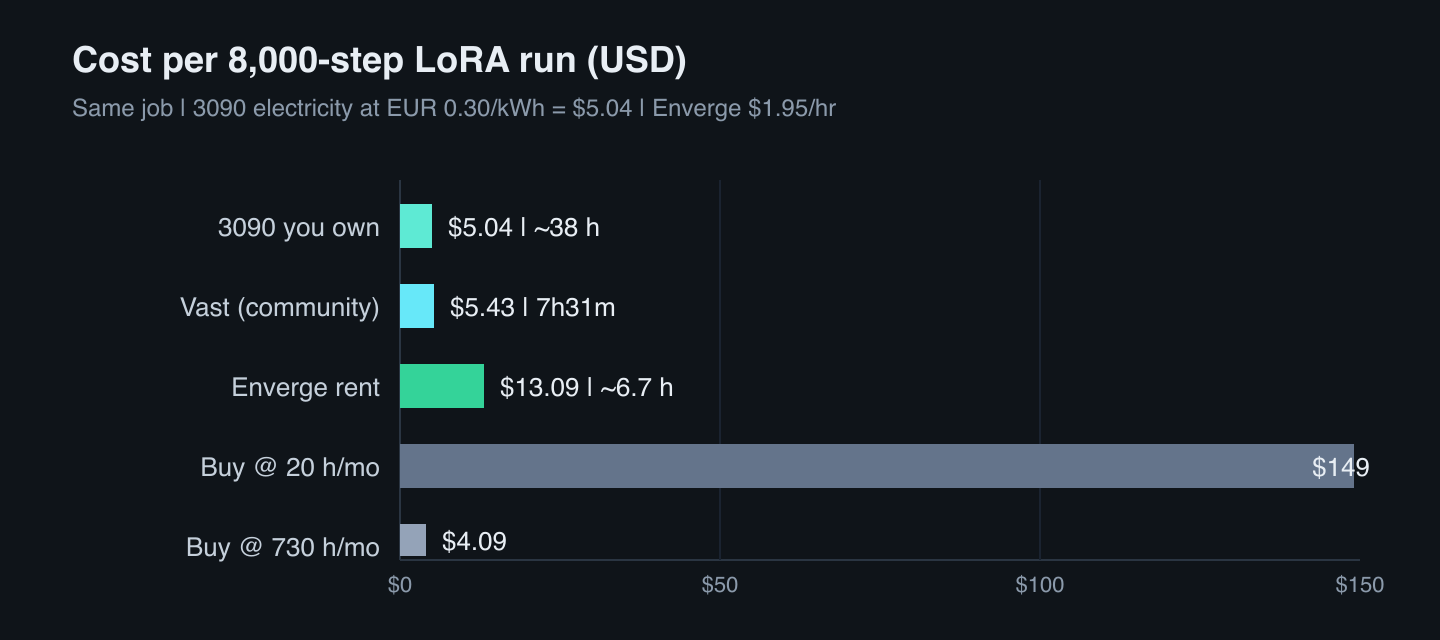
Same 8,000-step job. All figures in USD. The community quoted electricity in euros; we convert once at the ECB rate used in the appendix and keep that tariff for every local line.
| Option |
Time |
Cost (USD) |
Notes |
| 1. 3090 you own (300 W, community) |
~38 h |
$5.04 |
Electricity only, at €0.30/kWh → USD; card already paid for |
| 1b. 3090, cheaper power |
~38 h |
$0.84–$0.50 |
Same kWh, at €0.05 / €0.03 (commenter tariffs) |
| 2. Rent on Enverge |
~6.7 h |
$13.09 |
$1.95/hr × 6.71 h |
| 3. Rent on Vast (community run) |
7h31m |
$5.43 |
Their listing at $0.722/hr (Jan 2026) |
| 4. Buy at $16,000 MSRP |
— |
$4–$149 / run |
Depends on monthly use (chart below) |
At the community's €0.30/kWh tariff the owned 3090 is about five dollars. At €0.05 it is under a dollar. In winter the heat is free heating — a point several commenters made, and a fair one.
Renting on Enverge costs about $8 more than that $5.04 case. It also returns a little over thirty hours.
Sit with those two numbers for a second. We will come back to them.
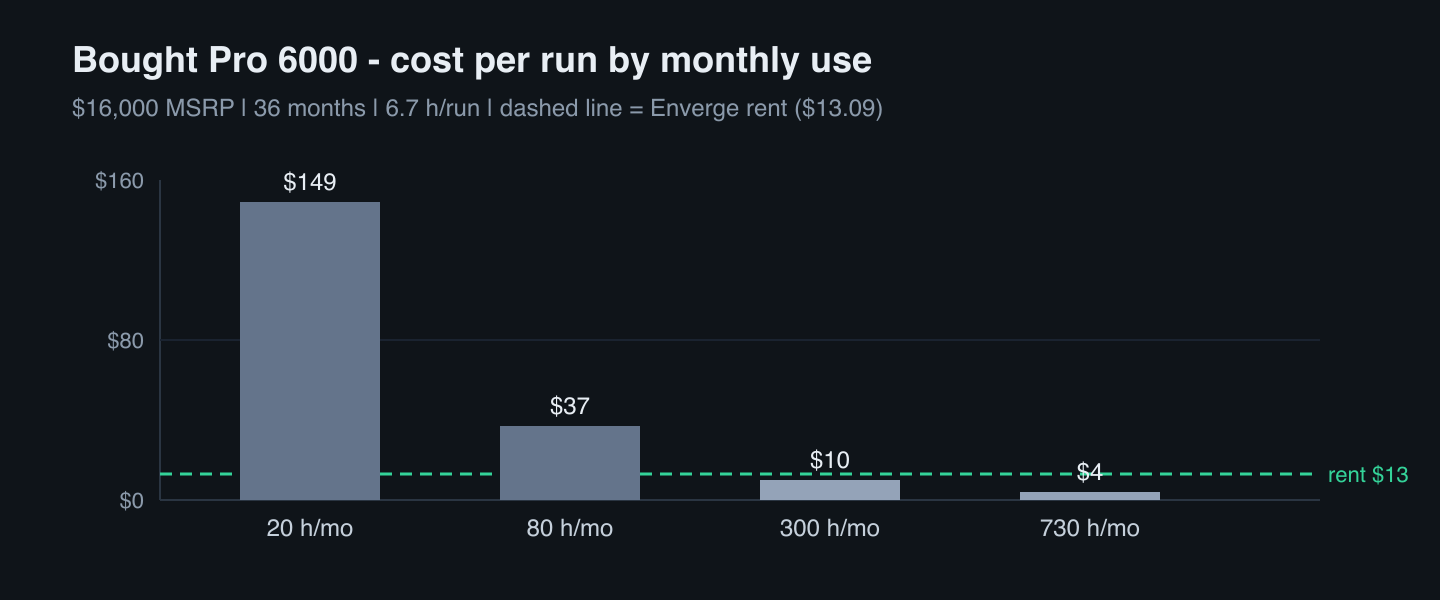
Buying only looks cheap when the card never sits idle:
| Hours / month |
$/GPU-hour (36 mo @ $16k) |
$/run at 6.7 h |
| 20 |
$22.22 |
$149 |
| 80 |
$5.56 |
$37 |
| 300 |
$1.48 |
$10 |
| 730 (never idle) |
$0.61 |
$4 |
Break-even against renting at $1.95/hr is about 8,200 GPU-hours — more than one run like this every day for three years. Even at a ~$14,000 street price you are still near one run a day for three years.
Why not just use Vast?
Vast and Enverge are both ways to rent someone else's GPU by the hour. The difference is specialisation: Vast is a general marketplace of many hosts and cards; Enverge is a fixed catalogue of the same Workstation Edition RTX Pro 6000 we timed.
For a one-off, non-sensitive run where the hourly sticker is everything, a general marketplace is a reasonable tool. The community runner paid $0.722/hr on Vast for that January listing.
The rest of the bill is product shape, not the digit on the listing:
- Price. A marketplace rate is a snapshot. Supply shifts; the listing you book tonight may not exist next Tuesday. Enverge is a fixed $1.95/hr.
- Hardware. The same runner reported switching instances until one was fast — billed time, plus another model download each try. Every Enverge host is the same Workstation Edition RTX Pro 6000 we timed. Nothing to shop for.
- Transfer. Vast charges per byte in both directions at a rate each host sets (pricing docs). A LoRA job pulls weights in and ships checkpoints and samples out. Enverge charges no ingress or egress fees.
- Stopped storage. On Vast, storage keeps billing when the instance is stopped. A stopped Enverge instance costs nothing — and keeps nothing. Cold start means another
9 minutes of setup (30¢). Script the install and weights pull; prefer one long session over many short ones.
- Interruptions. Cheap marketplace listings are often interruptible — "50%+ cheaper than on-demand," and they "may be paused." An Enverge instance stays yours until you delete it. Not paused. Nor reclaimed.
- Whose machine. A marketplace listing is someone else's box. That is the privacy objection in one sentence. An Enverge host is exclusive to one customer and close to bare metal.
No villain here. Different specialisations. Different trade-offs. Pick the ones you care about.
When each option is right
Keep training on the 3090 if the model fits without offloading, power is cheap, or the run can finish overnight while you are away from the desk.
Rent the big runs when 24 GB forces offloading and the hours matter — deadline, paid work, or you want another iteration today. Time a few hundred steps first. Compare steps/hour to your 3090 log. Then decide.
Use a general marketplace when price per hour dominates and you are fine with host variance, per-listing transfer fees, and possible interruptions.
Buy a Pro 6000 only if it would stay busy most days for years — or the data cannot leave the building.
Those two numbers again: about eight dollars more, a little over thirty hours back. Divide them and the unit that actually decides the rent case is not dollars per run. It is roughly twenty-five cents for each hour you get back.
Measure once, then choose
You do not need our conclusion. You need your steps-per-hour.
Run a few hundred steps of your config on a rented Pro 6000. Compare to the 3090 log you already have. If the gap is 2×, you mostly bought a faster chip. If it is closer to 5–6×, you bought your way out of offloading. Either way the number is yours, not a brochure's.
Try the card we measured
Launch an RTX Pro 6000 on rtx-pro-6000.enverge.ai — $1.95/hr, billed by the minute, SSH and Docker ready. Run your own short LoRA. Keep the receipts.
FAQ
Is renting an RTX Pro 6000 cheaper than training on my 3090?
No, not against a 3090 you already own. Our projected 8,000-step LoRA costs about $13 on Enverge versus about $5 in electricity on a 300 W 3090 at the community's €0.30/kWh tariff (formula). You pay about $8 more and get over 30 hours back — about 25 cents per hour saved.
Why is an RTX Pro 6000 so much faster for LoRA training?
Most likely because 96 GB holds the full model and removes layer offloading. Our run peaked at 65.9 GB of VRAM; a 24 GB card has to offload or quantize for the same job. We did not measure an offloaded Pro 6000 pass, so treat the split between silicon and memory as inferred.
How much does one LoRA training run cost on a rented RTX Pro 6000?
About $13 for this Qwen-Image-2512 LoRA at 8,000 steps (projected from a steady 1,500-step run), at $1.95/hr. Add about 30 cents if the session starts cold and has to install the trainer and download ~54 GB of weights.
When does buying an RTX Pro 6000 pay off?
Against renting at $1.95/hr, break-even is roughly 8,200 GPU-hours — more than one run like this every day for three years at the $16,000 MSRP. Buying wins near saturation, or when the data cannot leave your building.
Appendix: how we got ~$5 in electricity
All local power figures come from that community run, not from our bench. Converted to USD once so the tables stay in one currency.
| Symbol |
Value |
Meaning |
S |
8,000 steps |
Target run length |
v_300 |
208.6 steps/h |
3090 speed at 300 W (community) |
P_300 |
0.38 kW |
300 W GPU + 80 W rest of system |
c_kWh |
€0.30/kWh |
Community electricity tariff (Germany) |
fx |
1.1537 USD/EUR |
ECB reference, 2026-09-16 |
T_300 = S / v_300 = 8,000 / 208.6 = 38.35 hE_300 = P_300 × T_300 = 0.38 × 38.35 = 14.57 kWhC_300 = E_300 × c_kWh = 14.57 × 0.30 = €4.37- In USD:
C_300 × fx = 4.37 × 1.1537 = $5.04
That is the $5.04 line in the comparison table. Cheaper tariffs in the table use the same E_300 at €0.05 and €0.03/kWh.
This post sparked from that r/StableDiffusion thread. It is the original inspiration; the Pro 6000 timings and method above are our own re-run.
Enverge rents NVIDIA GPUs by the minute — including the RTX Pro 6000 Workstation Edition we used for this benchmark — on surplus renewable energy. Launch at rtx-pro-6000.enverge.ai.