How many tokens per second can one RTX Pro 6000 serve?
TL;DR: One RTX Pro 6000 serving Qwen3.6-35B-A3B in FP8 on vLLM produced 1,493 output tokens per second at 16 concurrent requests, with every user still seeing ~99 tok/s. MTP speculative decoding added about 40% to both numbers. At $1.95/hr, a busy card works out to about $0.30 per thousand requests. Every figure below is from our own card, measured 2026-09-19.
Most inference numbers you find for this GPU are someone else's. Until now that included ours: the throughput claims on this site leaned on third-party benchmarks because we had not run our own.
So we took one RTX Pro 6000 Workstation Edition out of the rental pool and gave it a real serving job: a current mixture-of-experts model, a request shape copied from live API traffic, and a concurrency sweep from 8 to 64. Here is what one card does, what to turn on, and what it costs.
What we measured
|
|
| GPU |
1× RTX Pro 6000 Blackwell Workstation Edition, 96 GB GDDR7, on a production Enverge.ai host in the UK |
| Model |
Qwen/Qwen3.6-35B-A3B-FP8: 35B parameters total, about 3B active per token |
| Server |
vLLM v0.29.0 (official vllm/vllm-openai image), FP8 KV cache, chunked prefill, 131k context |
| Request shape |
~4.5k input tokens (1.8k of them a shared prefix) and ~0.8k output tokens, roughly what this model sees from real API callers |
| Load |
vllm bench serve, 12 × C prompts per concurrency level C, run once with MTP off and once with MTP on |
The full launch command is in the appendix. We picked this model because it is a realistic thing to serve on one card: its FP8 weights take about a third of the 96 GB, and the rest becomes KV cache.
That KV cache turned out to be enormous. vLLM reported 4.9 million tokens of it, enough for 37 requests at the full 131k context at once. Memory never limited us. Compute did.
The numbers
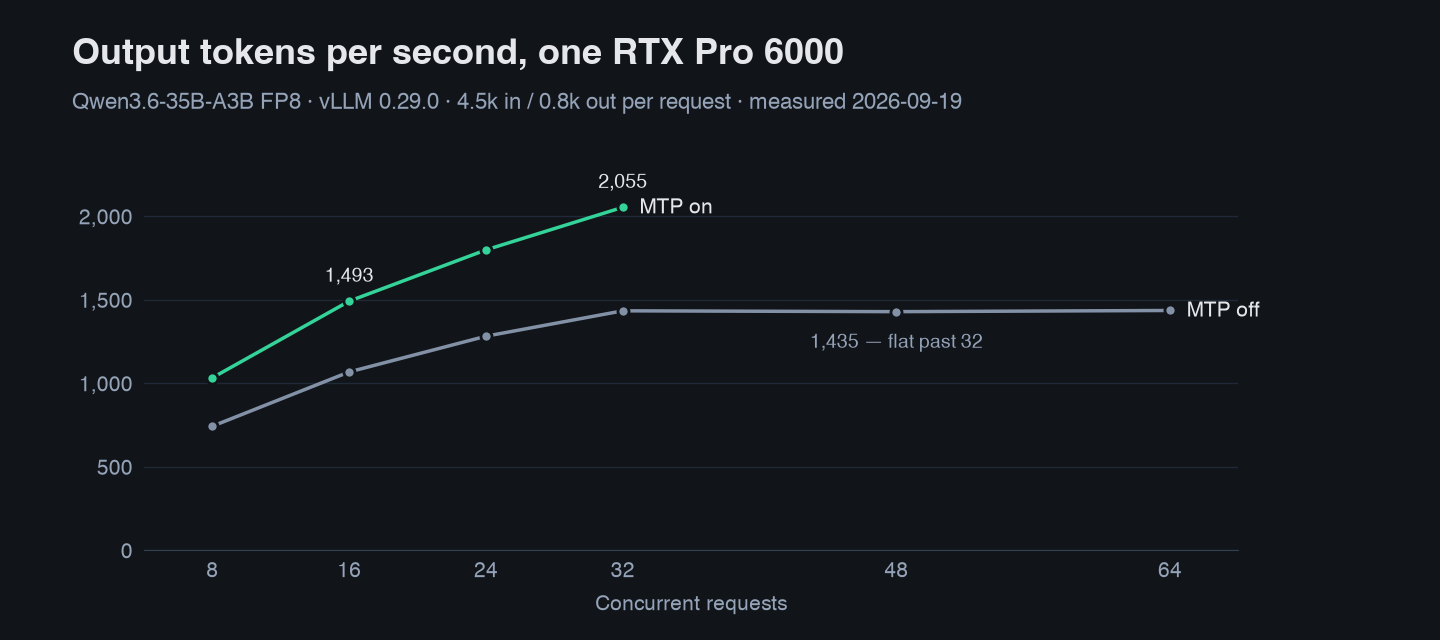
| Concurrent requests |
MTP off, total out tok/s |
MTP on, total out tok/s |
MTP off, tok/s per user |
MTP on, tok/s per user |
MTP on, p99 time to first token |
| 8 |
744 |
1,034 |
98 |
144 |
2.8 s |
| 16 |
1,069 |
1,493 |
70 |
99 |
1.7 s |
| 24 |
1,283 |
1,800 |
55 |
79 |
2.6 s |
| 32 |
1,435 |
2,055 |
47 |
68 |
3.4 s |
| 48 |
1,430 |
not run |
46 |
not run |
18 s (MTP off) |
| 64 |
1,437 |
not run |
46 |
not run |
24 s (MTP off) |
Two things stand out.
Without MTP, the card tops out at about 1,435 output tok/s, and it gets there by 32 concurrent requests. Going to 48 or 64 adds nothing except queueing: p99 time to first token jumps from seconds to 18–24 seconds. If you are sizing a server, ignore the right half of that curve.
With MTP on, every measured point is about 40% higher, and per-user speed rises too. That second part is the unusual one.
Why MTP wins on both axes
Speculative decoding usually trades one number for another. A cheap draft proposes a few tokens and the big model checks them in a single pass. That makes each stream faster, but the verification work often eats into total throughput once the batch is large.
Qwen3.6 ships with multi-token prediction (MTP) heads built into the model, so the draft costs almost nothing extra. We ran it with two speculative tokens ({"method":"mtp","num_speculative_tokens":2}). On this card, with this model, it won in both directions:
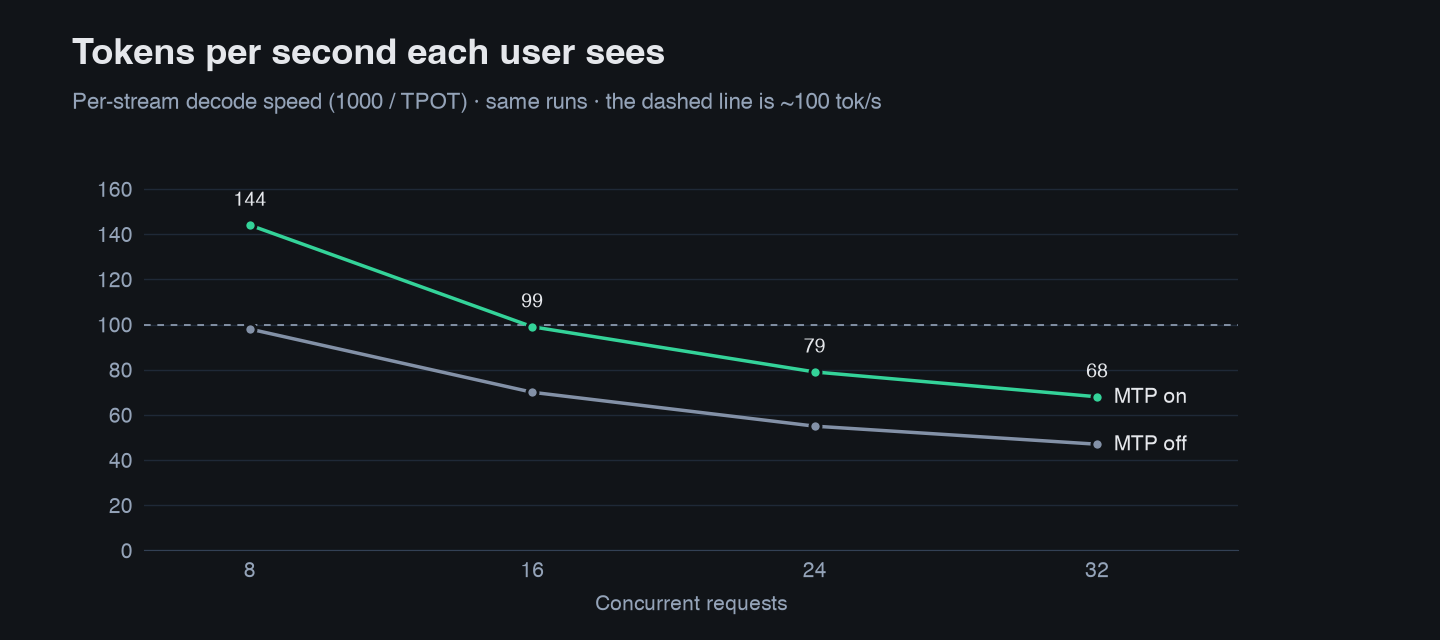
At 16 concurrent requests, MTP lifted total throughput from 1,069 to 1,493 tok/s and per-user speed from 70 to 99 tok/s. The MTP-on card at 32 requests (2,055 tok/s) beats the MTP-off card at any concurrency we tried.
How much MTP helps depends on how often the model accepts its own draft tokens, and that depends on what it is generating. Our prompts were synthetic, so treat the 40% as the result for this request shape. Your own traffic could land higher or lower. Re-check after any vLLM upgrade too, since speculative decoding changes from release to release.
The catch: MTP silently turns off prefix caching
This one is easy to miss, because vLLM accepts --enable-prefix-caching either way.
With MTP on, our prefix-cache hit rate was 0.0% over 2.9 million queried tokens. With MTP off, the same check hit 2,096 of 3,215 tokens. vLLM does log the reason at startup: on a hybrid-attention model like Qwen3.6, combining it with EAGLE-style speculative decoding makes vLLM fall back to a mode where cached prefixes cannot be reused. Nothing else warns you.
That makes the 40% gain more impressive. Our requests carried a 1.8k-token shared prefix, which the MTP-off runs could reuse and the MTP-on runs could not. MTP won without the cache.
The cache would matter more if your traffic is mostly prefix: long system prompts, RAG with stable context, or multi-turn chat that resends the history. For prompts with a heavy shared prefix and short outputs, benchmark MTP off with caching against MTP on. For a typical generation-heavy mix like ours, MTP is the better pick.
Picking the concurrency
There is no single "tokens per second" for a GPU. There is a curve, and you choose where to sit on it:
- 8 concurrent: 144 tok/s per user. Feels instant, but uses half the card.
- 16 concurrent: 1,493 tok/s total at 99 per user. This is where we would run it. It is the highest concurrency that still holds about 100 tok/s per stream, and p99 time to first token stays under 2 seconds.
- 32 concurrent: 2,055 tok/s total at 68 per user. Good for batch jobs, evals and synthetic data, where nobody watches tokens arrive.
If a human or an agent loop is waiting on each response, per-user speed is the number that matters. If you are working through a queue overnight, total throughput is. Same card, same model, different setting.
What it costs
At 16 concurrent requests the card completed 1.81 requests per second, or about 6,500 per hour. At $1.95/hr:
$1.95 ÷ 6,516 requests ≈ $0.30 per 1,000 requests (4.5k in, 0.8k out each)
For comparison, a per-token API at roughly the cheapest FP8 rate for this model on OpenRouter in September 2026 ($0.10 per million input tokens, $0.85 per million output) charges:
4,500 × $0.10/M + 800 × $0.85/M ≈ $1.13 per 1,000 requests
At full load, renting is about 3.8× cheaper. You are rarely at full load, though, and that is the real question. Break-even is about 26% utilisation: roughly 1,700 requests of this shape per hour, sustained. Above that, renting wins. Below it, a per-token API is cheaper, because you only pay for the tokens you use.
Pushing to 32 concurrent requests lowers the rented cost per request by about 27%, in proportion to the extra throughput, if you can accept 68 tok/s per user.
What this leaves out, in both directions:
- Cold start. The FP8 weights are about 35 GB. A fresh instance spends a few minutes downloading them and loading vLLM before serving anything. Over a long session that is noise. For a one-hour job it is a real share of the bill.
- Your own tokens. Change the 4.5k/0.8k split and the result changes. Output-heavy traffic favours renting even more, because output tokens are what per-token APIs charge most for.
- Control. On a rented card you pick the model, the quantisation, the context length and the sampling, and your prompts never leave the machine.
When one RTX Pro 6000 is the right server
- Steady internal traffic for an open model: agents, coding assistants, or a RAG backend that keeps the card above about a quarter busy.
- Batch generation: evals, synthetic data, or document processing at 32 concurrent requests, where total throughput is the only number that matters.
- Fixed model and settings: a fine-tune, an exact quantisation, or a long context that hosted APIs do not offer.
It is the wrong choice for spiky, low-volume traffic. A per-token API costs nothing when idle, and a rented card costs $1.95 every hour it runs.
Run the sweep on your own traffic
Launch an RTX Pro 6000 at rtx-pro-6000.enverge.ai: $1.95/hr, full root over SSH, with Docker ready for the vLLM image. Paste the commands below, swap in your own model and request lengths, and keep your own numbers.
FAQ
How many tokens per second does one RTX Pro 6000 serve with vLLM?
For Qwen3.6-35B-A3B in FP8, about 1,493 output tokens per second at 16 concurrent requests with MTP on, rising to 2,055 at 32 requests. Without MTP, the card levels off at about 1,435 tok/s from 32 requests upward. These are for ~4.5k-token prompts and ~0.8k-token outputs on vLLM 0.29.0.
Why does MTP speculative decoding speed up both total throughput and per-user speed here?
Because Qwen3.6's multi-token prediction heads are part of the model, drafting costs almost nothing, and the extra tokens accepted on each verification pass pay off even at 32 concurrent requests. We measured about 40% more on both numbers. That gain depends on how often draft tokens are accepted, so check it on your own traffic.
Does prefix caching work with MTP on vLLM 0.29.0?
Not for Qwen3.6. With MTP on, we measured a 0.0% prefix-cache hit rate over 2.9 million tokens, even with --enable-prefix-caching set. If your prompts are mostly a shared prefix, benchmark MTP off with caching before choosing.
Appendix: the exact commands
vLLM server, as measured:
docker run -d --name vllm-qwen36 --runtime nvidia --gpus all --ipc=host \
  -p 127.0.0.1:8000:8000 \
  -v /var/lib/vllm/hf:/root/.cache/huggingface \
  vllm/vllm-openai:v0.29.0 \
  --model Qwen/Qwen3.6-35B-A3B-FP8 \
  --served-model-name qwen3.6-35b-a3b \
  --max-model-len 131072 \
  --language-model-only \
  --kv-cache-dtype fp8 \
  --enable-prefix-caching \
  --enable-chunked-prefill \
  --enable-auto-tool-choice --tool-call-parser qwen3_coder \
  --reasoning-parser qwen3 \
  --max-num-seqs 32 \
  --gpu-memory-utilization 0.92 \
  --speculative-config '{"method":"mtp","num_speculative_tokens":2}'
Drop the last line for the MTP-off run. The load sweep:
for C in 8 16 24 32 48 64; do
  docker run --rm --network host --entrypoint vllm \
    -v /var/lib/vllm/hf:/root/.cache/huggingface \
    vllm/vllm-openai:v0.29.0 bench serve \
      --backend openai-chat --base-url http://127.0.0.1:8000 --endpoint /v1/chat/completions \
      --model Qwen/Qwen3.6-35B-A3B-FP8 --served-model-name qwen3.6-35b-a3b \
      --dataset-name random --random-prefix-len 1800 --random-input-len 2700 \
      --random-output-len 800 --random-range-ratio 0.5 \
      --num-prompts $((C * 12)) --max-concurrency $C \
      --percentile-metrics ttft,tpot,itl,e2el --metric-percentiles 50,90,99
done
Per-user speed in the tables is 1000 ÷ the median time per output token (TPOT, in ms). Check that the report's mean input length comes out near 4.5k. vLLM versions combine prefix and input length differently, so adjust the two flags until it does.
Enverge rents NVIDIA GPUs by the minute, including the RTX Pro 6000 Workstation Edition we used for this benchmark, on surplus renewable energy. Launch at rtx-pro-6000.enverge.ai.