Can you run Omniverse DSX on a rented RTX Pro 6000?
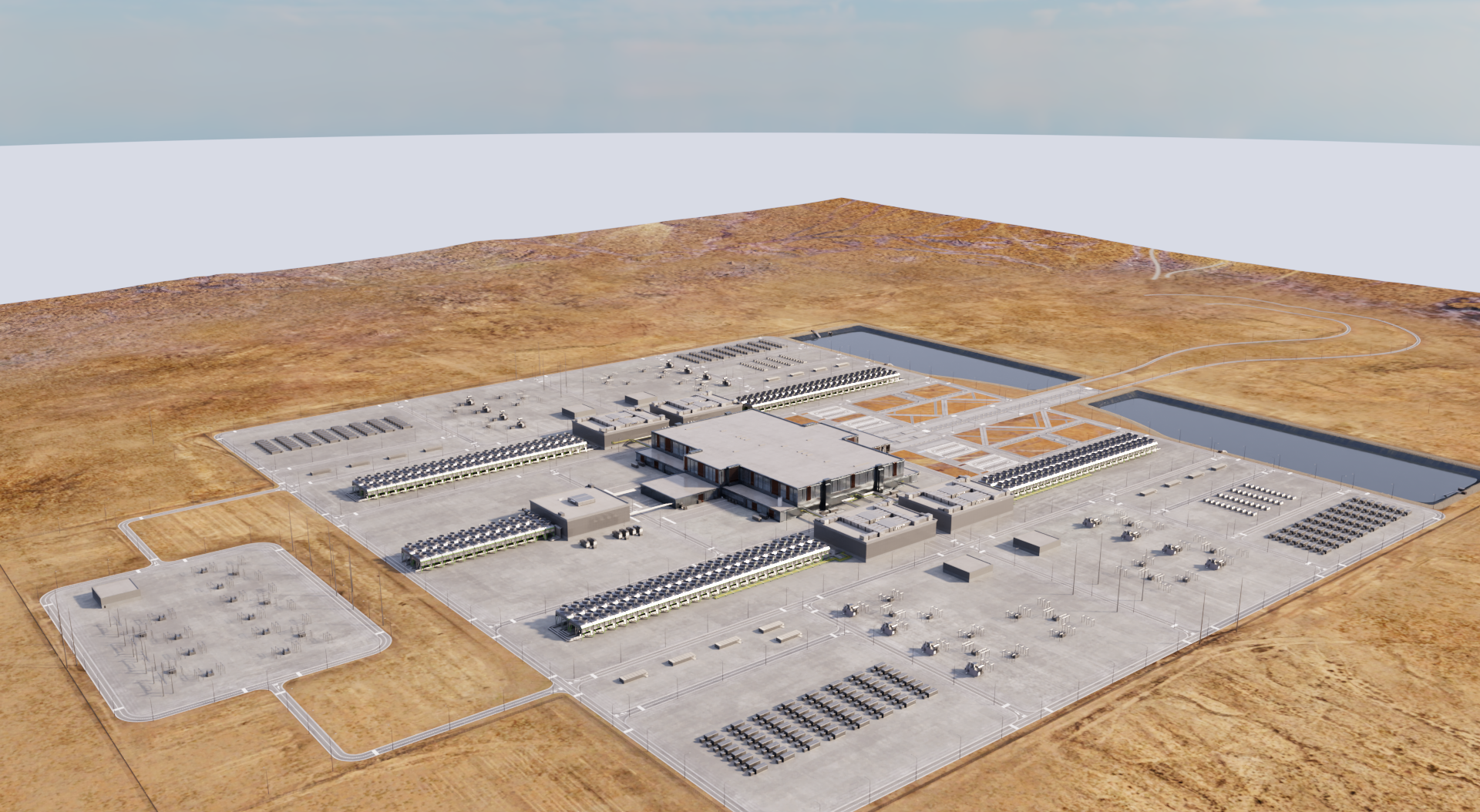
NGC pack stage DSX_Main_BP.usda — the GTC25 Aurora campus shell — path-traced headless on an Enverge.ai RTX Pro 6000. Cooling towers, substation yard, retention basins, the grey compute mass. Kit logged RTX ready about thirty-two seconds after the stage came up.
We did not open with the SKU.
Someone asked us a signup question that deserves a road test, not a brochure:
I’m interested in renting your NVIDIA RTX Pro 6000 instance to develop and customize the NVIDIA Omniverse DSX Blueprint for AI Factories. The application is an Omniverse Kit app that renders a large 3D scene with RTX ray tracing and streams it to a separate web frontend over WebRTC.
That is two products in one sentence. This post answers the first: can you develop and render DSX Kit with RTX on a rented Enverge.ai Pro 6000? The stream-to-browser half is a different post. We did not test WebRTC, and we will not sell it as done.
NVIDIA’s DSX prerequisites already name RTX Pro 6000 Blackwell, Ubuntu 22.04 / 24.04, driver 570.169+, 64 GB RAM, and 20 GB+ free (1 TB NVMe recommended). The blueprint repo is public. A chatbot can recite that table.
What it cannot recite is whether Kit’s RTX path still works when the machine is a dedicated Enverge.ai instance at $1.95/hr: Ubuntu 24.04, SSH only, no GDM, no DisplayPort cable — what most people look for.
We rented that shape. We ran the smoke. Below is the checklist, the friction, and the still at the top of this page.
Scope: Kit + RTX on a local / NGC USD stage. Not Nucleus omniverse:// live auth. Not WebRTC / App Streaming to the web UI.
Who this is for (and who should walk away)
Enverge.ai fits if your DSX week looks like SSH, repo.sh, headless Kit (--no-window), and iterating on USD / RTX without a Kit window on your desk every hour.
A workstation fits if you need a physical display, click-through installer dialogs, or an interactive editor as the daily driver.
Nobody wins if you treat “GPU matches the datasheet” as “full DSX portal with WebRTC works.” That leap is how rented-GPU marketing usually lies. Matching the SKU is table stakes. Surviving headless Linux is the product question.
What NVIDIA says you need
NVIDIA’s own table is blunt (DSX prerequisites):
| You need |
Spec |
| OS |
Ubuntu 22.04 / 24.04 (not 25.04), or Windows 10/11 |
| GPU |
RTX Pro 6000 Blackwell |
| Driver |
570.169 or newer (nvidia-smi) |
| RAM |
64 GB |
| Disk |
1 TB NVMe recommended; at least 20 GB free |
On Linux, two more landmines sit outside that table — from DSX troubleshooting and the Kit Linux guide:
- Turn IOMMU off, or Kit can sit for half an hour on a zenity “OK” dialog that never reaches your SSH session.
- Prove Vulkan, not only
nvidia-smi. Kit’s RTX path on Linux is Vulkan-first. NVIDIA tells you to run vulkaninfo. No monitor? Run Kit headless with --no-window.
The blueprint lives here: omniverse-dsx-blueprint-for-ai-factories.
What you actually get when you rent Enverge.ai
SSH into an Enverge.ai Pro 6000 and you get one dedicated physical card, Docker, CUDA, and Ubuntu 24.04, at $1.95/hr. The host is headless on purpose — fine for training jobs, awkward for anything that assumes a desktop and a mouse.
It is not a Windows tower with a DisplayPort cable. There is no GDM session waiting for you. If your mental model of Omniverse is “open Kit, click File → Open,” you will need a different mental model: repo.sh, Carb settings, log greps for RTX ready, and a still-capture script when you want proof you can paste into a design review.
That shape is why the signup question is interesting. CUDA training jobs rarely care about Vulkan ICDs or zenity. DSX Kit does. Renting the right SKU without measuring the render path is how you spend an afternoon discovering prerequisites that were never on the marketing page.
Our smoke driver was 610.57.04 — above the 570.169 floor, newer than the R570 / R580 / R595 pins NVIDIA lists as fully validated for DSX. Read that as “may work”; do not read it as “certified.” Re-check the pin on the day you publish a customer answer — NVIDIA’s table moves.
How you run it (day-zero checklist)
Copy the scripts from Enverge-Labs/omniverse-dsx-rtx-pro-6000-smoke onto the instance, or follow the same order by hand. What actually mattered for us:
1. Vulkan first
vulkaninfo
If this fails, stop. Do not debug Kit yet.
On our first env dump the Vulkan ICD was missing. After the ICD was present, vulkaninfo saw the Pro 6000. nvidia-smi alone would have declared victory too early — CUDA and NVML can look healthy while Kit’s RTX path still has no driver to talk to.
2. Headless Kit
./repo.sh launch -d dsx.kit -- --no-window
With a stage:
./repo.sh launch -d dsx.kit -- --no-window \
  --/app/auto_load_usd=/path/to/stage.usd
Windowed Kit wants a real display. Enverge.ai instances do not ship one. --no-window is the documented escape hatch, not a hack.
3. The package nobody puts on the marketing page
sudo apt-get install -y libglu1-mesa libxt6 libxmu6 libxi6
Skip libglu1-mesa and RTX’s MDL / neuray path fails. Hydra never builds the scene renderer. The card is fine. The materials are not. We hit this once: first launch failed the RTX path, we installed GLU, the next launch crossed into RTX ready.
4. Load something real
Empty Kit sat near 0.9 GiB VRAM for us — not the test. Ownership of a Pro 6000 is table stakes. Kit cares whether Vulkan is present and whether a USD stage reaches the RTX renderer.
| Stage |
What happened |
Kit usd_viewer stage01.usd |
RTX ready · peak ~5.3 GiB · util ~62% |
Synthetic dense_grid.usda (64k cubes) |
RTX ready · ~4.2 GiB · 100% util |
NGC DSX_Main_BP.usda |
RTX ready ~32 s · aerial still at top |
NGC content pack: nvidia/omniverse/dsx_dataset v2.1 (DSX_BP_.zip). Point auto_load_usd at …/DSX_BP/Assembly/DSX_Main_BP.usda. Capture scripts (07-capture-stills.sh), OptiX / path-trace notes, env dumps, and Kit excerpts live in the smoke repo.
The still is NVIDIA’s reference-campus digital twin from the NGC pack — evidence that Kit’s RTX path ate the official stage, not a claim about how many racks “fit” on that fictional pad. The campus shell is large (order of tens of acres in the twin). We used it as a stress stage, not as a facilities proposal.
Scenes from the smoke (not the brochure)
The ICD miss. First env.txt looked broken: vkCreateInstance: Found no drivers!. Same box, later, after the NVIDIA Vulkan ICD was available: vulkaninfo OK. If you publish a smoke that only shows nvidia-smi, you have not smoked DSX.
The GLU fail → fix. Launch without libglu1-mesa. Watch the MDL / neuray path complain. Install the package. Rerun. RTX ready. That single apt line is more important than most of the SKU marketing on cloud GPU pages.
The zenity that never came. NVIDIA says disable IOMMU. Ours was still on. Kit printed a warning. Zenity was not installed. No hang. Lucky on that host class — not a strategy. If you own the machine, flip IOMMU off on purpose. It is not an apt install fix from inside a tenant alone.
Cold vs warm. NVIDIA quotes 15–20 minutes for a first build and ≥20 GB free. Our tree was already warm: blueprint ~2.9 GB, packman cache ~12 GB, Kit up in seconds after launch. Cold images still owe NVIDIA’s clock. At $1.95/hr that tax is real; it is also smaller than a wasted workstation afternoon spent discovering Vulkan and GLU the hard way.
What we don't claim (yet). Nucleus live auth. Browser stream. App Streaming. The aerial proves Kit ate DSX_Main_BP headless — nothing else.
The still that was noisy, then wasn’t. First captures looked speckled under path tracing. The fix was not “buy a louder GPU.” It was OptiX denoising (nvoptix.bin on the instance), PathTracing with a high totalSpp budget, and enough accumulate time for the campus aerial to settle. That is the difference between a screenshot that sells the SKU and a still that documents the stage. Scripts and notes live in the smoke repo alongside the PNG.
The three gates that decided the question
1. Vulkan and a loaded stage
If your demo stops at nvidia-smi, you have not tested DSX. Empty Kit at ~0.9 GiB is a process, not a product proof. RTX ready on Kit’s stage01, then on a dense synthetic grid, then on official NGC DSX_Main_BP, is the bar we used.
2. Headless life vs dialog life
Rented Linux without a desktop is a different product than a tower under your desk. --no-window is documented. IOMMU + zenity is documented. We cleared the hang by accident (no zenity). You should clear it on purpose (IOMMU off) when you control the host.
3. Tuesday vs demo day
Matching the GPU SKU is how cloud pages win SEO. Shipping Kit + RTX on SSH is how you win a developer who has to customize DSX on Tuesday. Streaming the result to a browser is how you win a facilities walkthrough. We measured the Tuesday problem. The demo problem is next.
Decision list
- Rent Enverge.ai for Kit RTX develop when SSH + headless Kit is your loop and you can live without a daily interactive window.
- Keep a workstation when display-attached Kit is the job.
- Do not infer WebRTC from this PASS.
- Watch RAM — DSX wants 64 GB; some host classes meet the floor with no spare. Prefer headroom if your stage and tooling grow.
Bottom line
On our smoke (2026-09-24): Kit + loaded-stage RTX PASS, including official NGC DSX_Main_BP, on a rented Enverge.ai Pro 6000. Graphics API Vulkan, driver 610.57.04, still saved. Streaming stays open.
Scripts, logs, and stills are in the smoke repo.
If you are about to rent for DSX work, measure your own Kit launch the same way: vulkaninfo, headless dsx.kit, a real USD stage, grepped RTX ready, optional still. Do not buy the card story alone. Do not buy our PASS as a substitute for your stage and your driver pin.
If a fifty-acre AI factory can already look this real on a GPU you rent by the hour — before concrete, before a utility interconnect, before anyone signs for the land — what part of “building” the factory do you still insist has to wait for the physical pad?
Frequently asked questions
Does Enverge.ai support Omniverse DSX Blueprint today?
For Kit + RTX on a headless SSH instance with a local or NGC-pack USD stage: smoke PASS (including DSX_Main_BP). The WebRTC web frontend is not claimed.
Do I need a display?
For windowed Kit, yes. For headless develop/smoke, NVIDIA documents --no-window. Our instances have no desktop session by design.
What about the IOMMU / zenity hang?
Real and documented. On our smoke, IOMMU was on but zenity was missing — warning only, no hang. If you own the machine, still disable IOMMU.
Does this include streaming to the web UI over WebRTC?
No. That is the follow-up post.
Where are the logs?
In the smoke test repo.